


Asphalt Legends Special Event Calculator
Complete User Guide
The Special Event Calculator is a free tool for Asphalt Legends players that helps them plan their participation in in-game special events and maximize rewards without extra investment.
It helps you calculate which rewards are available with your garage, as well as select the minimum requirements for cars to achieve specific goals.
The calculator interface consists of four sections: global settings, cars, rewards, and the calculation button. Each section is described in detail below.
Global Settings
Global settings allow you to quickly manage the calculation parameters and reward calculation and display parameters.
The following switches are available:

-
MAX All - automatically assigns all cars the maximum possible star rating. If you switch back, the values will return to the manually specified ones.
-
OC All - similar to the previous switch activates overclock on all cars simultaneously. When disabled, the overclock state of each car also returns to its default state.
Please note: this switch is not available in every event.
-
Packs - controls the display of standard packs with blueprints and import parts in the rewards block. If you are only interested in the main rewards, you can hide the packs for convenience.
-
Club Rewards - Includes items that require several members of your club to complete conditions. It is useful if you actively play as part of a club.
Please note: this switch is not available in every event.
-
Pass Rewards - The switch is available only for Spotlight type events. When enabled, all rewards from the Spotlight Pass free tiers are included in the calculation.
It's important to remember: to receive pass rewards, you must complete all pass tasks without exception.
-
Paid Pass - also available only for Spotlight events. Allows you to switch between calculating free pass rewards and the total free and paid pass rewards calculation. This switch does not affect calculations unless the "Pass Rewards" switch is activated.
Cars Block
In this section, you enter the status of the cars in your garage. The calculator uses this data to calculate the rewards available to you.
Each car is represented by a block with it's image (clicking on it takes you to the database, where you can view detailed information about this car), it's name, and up to four customizable parametrs:
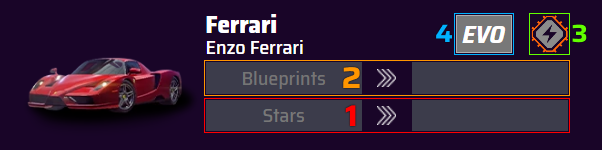
- Number of Stars - the current star rating of the car is selected in the left field; the star rating of the car, taking into account all the awards received, will be displayed in the right field after calculation.
- Number of Blueprints - the left field displays the number of blueprints beyond the current star rating. For example, if your car in the game displays 2 stars, and the progress bar shows 33/45 select a row with 2 stars in the stars field, and enter the number 33 in the blueprints field. The final number of blueprints will be displayed in the right field after the calculation.
- Overclock - displayed if the event condition is Overclock. A gray-orange icon means overclock is disabled; a solid orange icon means it's enabled.
- Evo Tuning - available in some events for cars with activated evo tuning. When enabled, the car's star rating is automatically set to maximum, and manual input of blueprints and stars becomes unavailable. The gray button is off, the purple-white button is on.
Rewards Block
The rewards section displays all available items based on the specified cars and enabled settings.
The rewards vary depending on the specific event, but the following fields are always present:
- Conditions - how many event conditions you can complete with the specified cars.
- End Stage - the number of the stage, beyond which it will not be possible to advance with the current status of cars.
- Credits - the total amount of credits in rewards.
- Tokens - the total number of tokens in rewards.
- Blueprints - the total number of blueprints received for all cars.
- Epic Import Parts — the total number of epic import parts for all cars.
- Blueprints and Parts Packs - the total number of blueprints or parts packs (displayed when the "Show packs" switch is turned on).
 Conditions - how many event conditions you can complete with the specified cars.
 End Stage - the number of the stage, beyond which it will not be possible to advance with the current status of cars.
 Credits - the total amount of credits in rewards.
 Tokens - the total number of tokens in rewards.
 Blueprints - the total number of blueprints received for all cars.
 Epic Import Parts — the total number of epic import parts for all cars.
 Blueprints and
  Parts Packs - the total number of blueprints or parts packs (displayed when the "Show packs" switch is turned on).
Clicking on the icons for blueprints, epic import parts, blueprint packs, credits or tokens will open a detailed list: for blueprints or epic import parts, a list of cars with the number of blueprints for each; for packs, a breakdown by class; for credits or tokens, breakdown by solo and club rewards.

In addition to the above, depending on the event, the rewards may include:
-
Displayed by default:
- Style Tokens
- Spotlight Tokens
- Spotlight Packs
- VIP Points
-
Displayed only if included in the result of calculations:
- Keys
- Decals
- Emoji
- Evo-tickets
If a reward is unique (received in a single copy), the numerical value is not displayed. If multiple rewards are earned, their number will be indicated next to the icon.
 Style Tokens
 Spotlight Tokens
 Spotlight Packs
 VIP Points
 Keys
Keys Decals
 Emoji
Emoji Evo-tickets
"Calculate" button
Once all cars parameters have been entered, click the "Calculate" button. The calculator will automatically determine the maximum achievable result for your cars set. If, while earning rewards, it becomes possible to increase the star rating of a particular car, the calculator will automatically take this into account and add to the total any additional rewards unlocked by such an increase.
FAQ
-
Q: Does the calculator take all rewards into account?
A: The calculator takes into account all rewards without the random factor. In other words, it includes stage rewards, progress rewards, and pass rewards, but excludes drops from packs, ranked stage rewards, and any purchases that can be made in the Spotlight store.
-
Q: Why does the reward counter show so many blueprints/epic import parts?
A: In the rewards section, the total number of rewards of a particular type is displayed. To view a more detailed list, click on the icon for the reward you're interested in.
-
Q: Why is there no “Locked” option in the star selection window for some cars?
A: Some cars require a key to unlock them; however, if such cars are participating in an event, they usually have a “Free Try” option, meaning you don't need a key to complete stages with that car. Even if you have a locked car, select the number of stars and blueprints you have available for it.
-
Q: Some stages in the event offer a car with the “Free Try” option for cars without key, but that car is locked for me. Do I need to select the 1-star option?
A: If a “Free Try” is offered in a stage for cars that do not require a key, the calculator will count the rewards available for 1 star, even if that car is locked for you. Select the “Locked” option in such cases to avoid inaccuracies in the calculations.
Other Tools and Resources
The Special Events Calculator is just one of the tools available on the site. If you want to gain a deeper understanding of the mechanics of Asphalt Legends or plan your progress in advance, check out the other sections:
- Calculator Archive - calculators for past events. Useful for understanding what rewards past events offered and for assessing your own progress.
- Season Calendar - an up-to-date schedule of upcoming and past events, so you always know what to prepare for in advance.
- Cars Database - complete information on all in-game cars, including a upgrade calculator. Helps you plan the development of your garage more accurately.
- News - Notes on new game and site updates, roadmaps and other important changes so you’re always up to date on the latest developments in Asphalt Legends.